An operational system that brings clarity & efficiency to your venue.
Take control of your event venue with The Venue Manager. A Notion powered system that handles the organisation of equipment, preparations, tasks, and knowledge all in one place.
Designed for small to mid-sized venues and technical professionals who need clarity across people, gear, and events.
System overview (screens / structure)
A Single System Designed for Real Event Work
Running an event venue or event business means managing a lot of moving parts at the same time: equipment, services, preparation tasks, staff, freelancers, and constantly changing event details.
In many places, this information ends up scattered — spreadsheets for inventory, notes for prep, messages for coordination, and important knowledge living only in people’s heads.
This system was built to replace that fragmentation with one structured, reliable place where everything related to event operations comes together — not as a theoretical framework, but as a practical working system that reflects how venues and event teams actually operate on a day to day basis.
Designed to support
- Equipment inventory that stays connected to real events
- Clear preparation workflows before and after events
- Task and service management that doesn’t rely on memory
- A shared knowledge base for staff and freelancers
- Solo to team integration, without constant explanation
The goal isn’t to add another tool — it’s to reduce friction, repetition, and avoidable mistakes.
For most venues and event businesses, the cost of disorganisation shows up quietly: extra prep time, repeated questions, last-minute confusion, and information gaps when people rotate. Recovering even a few hours — or avoiding a single preventable issue — already offsets the cost of the system: a one-time investment into clarity and structured consistency.
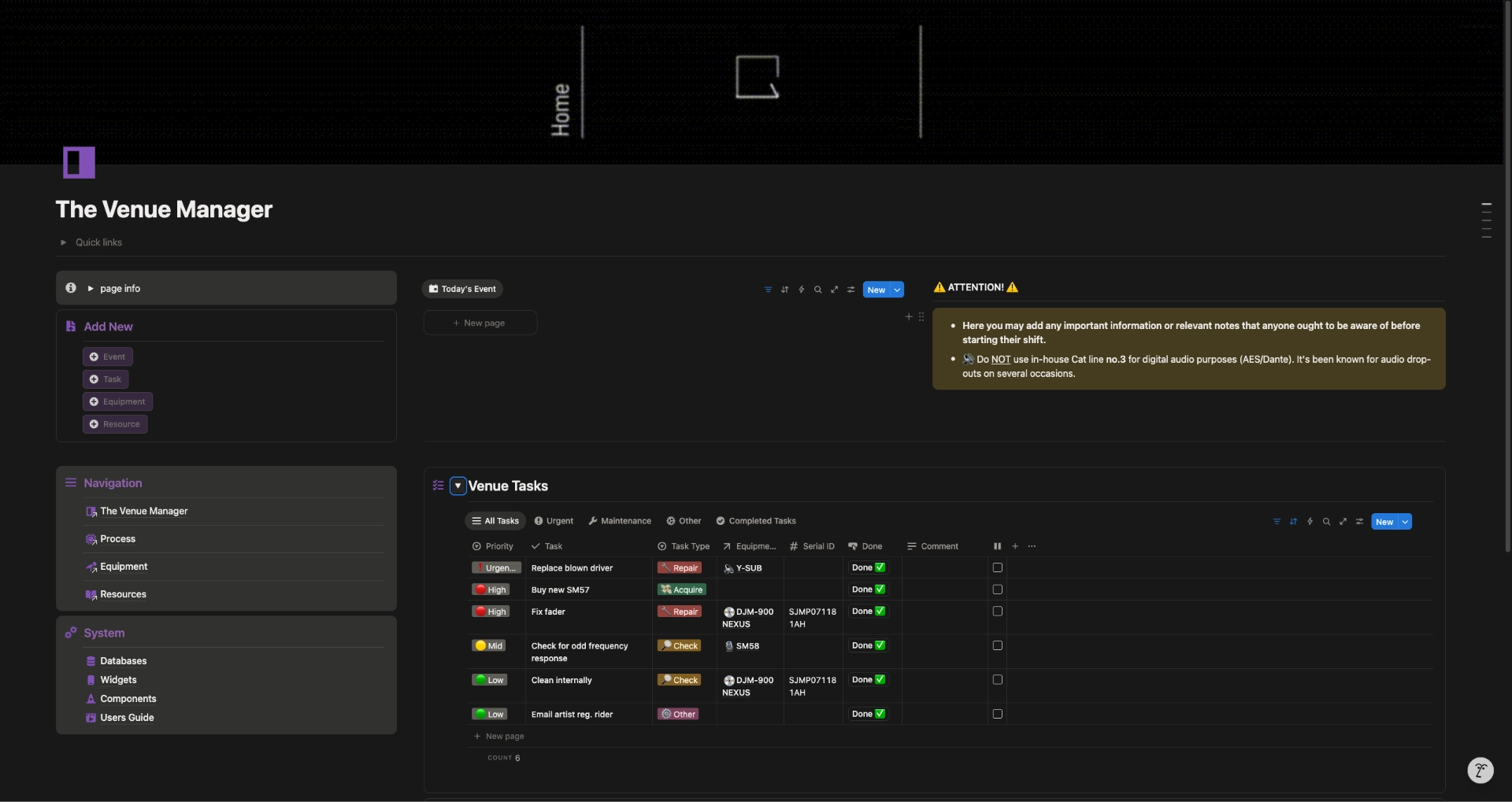
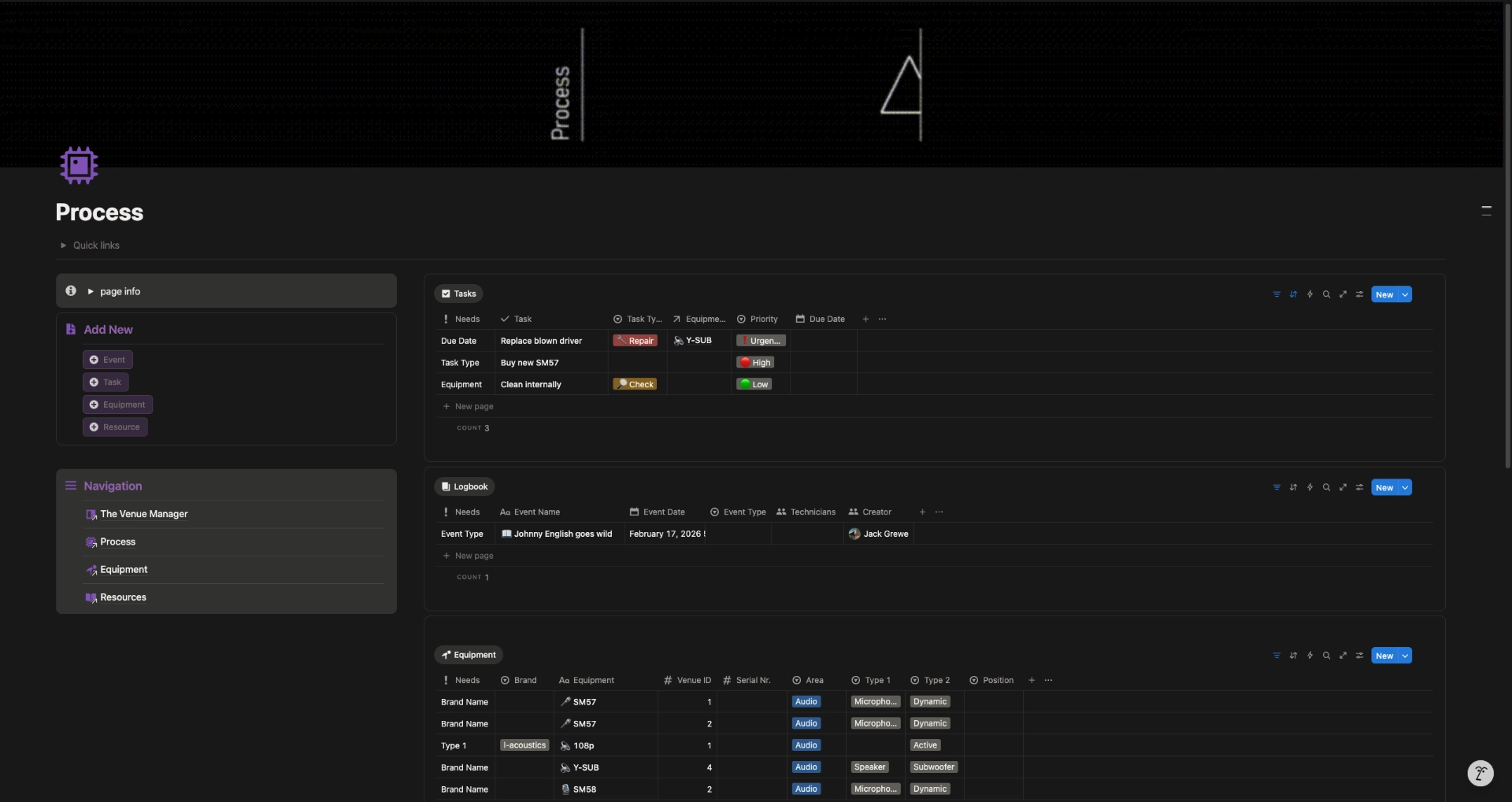
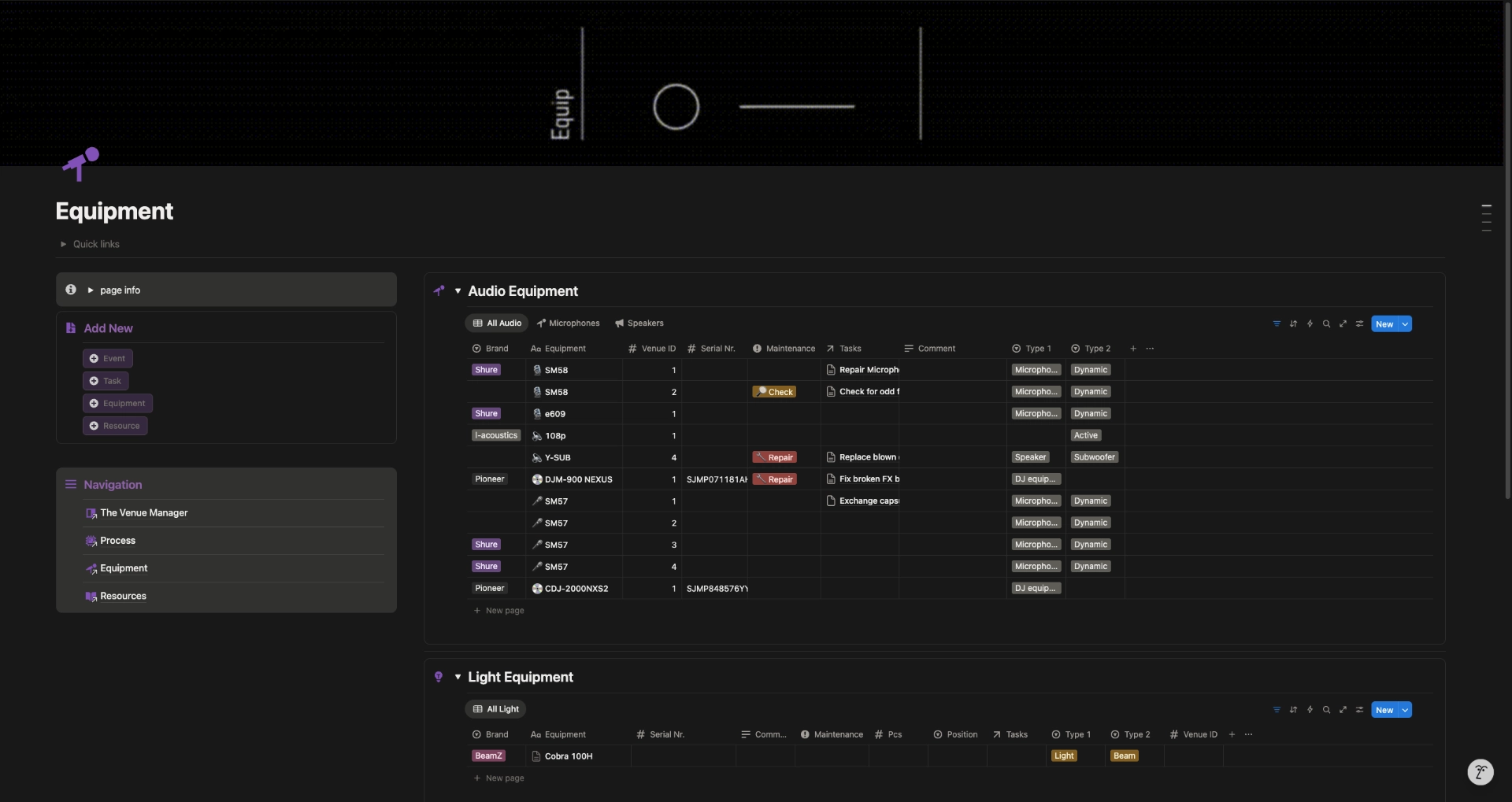
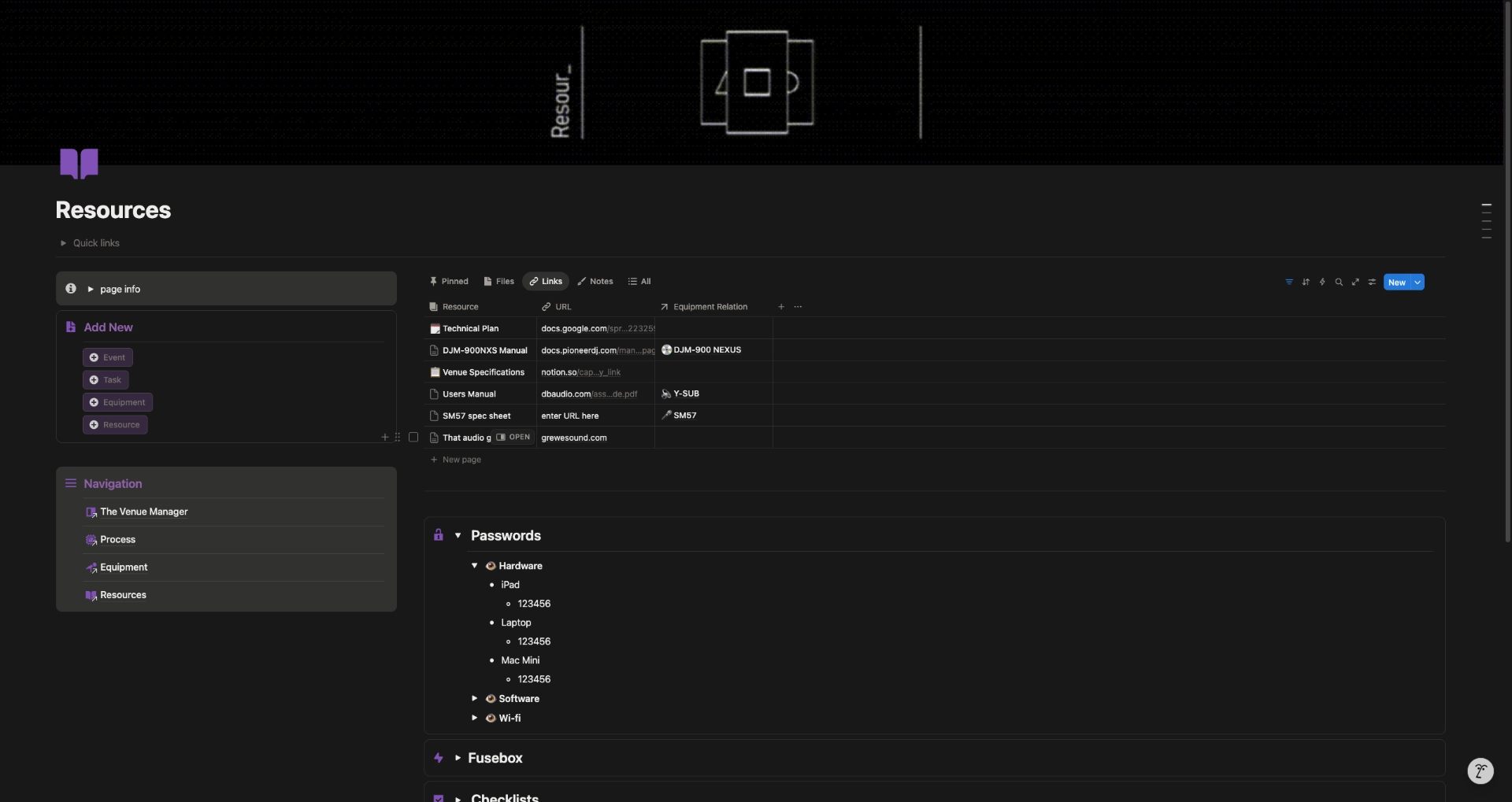



Guided Onboarding & Implementation Overview
The Venue Manager includes guided onboarding and practical educational material designed to help you understand the structure and adapt it to your workflow.
This section outlines what the onboarding covers.
How the system is structured
An overview of the main working spaces and how information connects across events, equipment, tasks, and shared knowledge.
Getting started with your own setup
Guided onboadring matering on how to take a clean copy of The Venue Manager and adapting it to your venue, team, or way of working.
Using The Venue Manager
Practical examples showing how preparation, equipment, and tasks come together around an actual venue.
Working with teams and freelancers
How to use the system as a shared reference point for internal staff and external collaborators.
Adjusting and extending the system
How to evolve the system over time without breaking its underlying structure.
All content is presented both in video and written format.
The total amount of video content adds up to about 90 min – long enough to learn everything relevant and short enough to quickly get new people and staff using the system effectively.
Features Overview
The Venue Manager
Processing Mode
A streamlined processing workflow that makes organizing simpler.
Quick Capture Components
Add new events, equipment & tasks with the click of a button.
Resource Pool
Store & access any relevant information – all in one place.
Inventory Organizer
Organize & find equipment by model or brand name, type, venue ID, serial nr. etc..
Event Planner
An intuitive event calendar with tools for pre- & post event organization.
Back-log Integration
Back track & review previous maintenance- & event notes.
Cross-Integrated Functions
Smart spider-in-the-web design for easy overview of any computing relationships.
Task Manager
A “GTD” like system with priority levels, task types, equipment relations & due dates.
Team & Individual use
Use solo or in teams for easy task assignment & sharing of information.
Self-study material
Pedagogical & easy-to-follow Instructional videos & documentation.
Mobile Widget Views
Intuitive widgets to access the template through your phone.
This Is Not For Everyone
The Venue Manager is probably not a good fit for those who:
- are looking for a lightweight or decorative Notion template
- want a plug-and-play tool without adapting it to your workflow
- aren’t responsible for actual event operations or technical equipment
- prefer to keep everything ad-hoc and informal
- just wish to explore Notion or event workflows out of curiosity
The Venue Manager is designed for people who desire structure, clarity, and consistency at their venue — whether working solo or with a team.
The Ultimate Venue Management Tool
Harness the true power of Notion
More than just a Template. Get the system that streamlines the technical managment of your venue and have events run smoother.
Venue / Pro Version
€599
One Time
Includes
Complete Operational System
Guided Onboarding Video
Tutorials & Documentation
Dark & Light Mode
Future System Updates
Per workspace license.
No subscriptions.
Individual / Freelancer version coming soon…
This is not a generic Notion template.
It’s a complete operational system, designed with real event workflows in mind and delivered with guided onboarding so it can be implemented without guesswork.
FAQ
Do I need to pay for a Notion subscription?
No, you do not need a paid Notion subscription to set-up and use The Venue Manager.
Notion provides a free plan which allows the The Venue Manager to be used under a single user account. This does not mean that your team and co-workers can’t also view and use The Venue Manager on site, but it does tie the system down to a single account.
To access more advanced Notion features (none which TVM depends upon) and ulock the possibility to invite other user accounts to co-work on The Venue Manager a subscription model is necessary.
More information on Notion subscription & pricing plans can be found here.
Are future updates included?
Yes, any minor updates and fixes are included in the purchase and you will be notified by email if a new version is released.
Would a Venue Manager 2.0 would be released any time in the future, this will be offered at a heavily discounted price for anyone already owning a license.
How does TVM operate on a mobile phone?
There are widgets created just for mobile within this template that make it easier to interact with The Venue Manager on mobile to quickly add new data or find basic information.
Notion is however always better on a larger screen no matter what workspace you use. It will be more aesthetically pleasing and you’ll enjoy all the benefits on a larger screen. There is simply to much information to fit on the screen of a phone and it not recommend fully operating this template from a handheld device.
When setting up the template for your first time and following the installation guide it’s ideal to have 2 tabs open to be able to follow along with the video guide(s) that are included.
Do you offer refunds?
If you purchase this template there’s unfortunatley no way for us to revoke your access, therefore, we do not offer refunds.
Who do I contact with questions regarding TVM?
You can reach out to me directly at jack(at)grewesound.com.
I’d be happy to answer any questions or hear your ideas about additional functions.
Is it possible to customize the system further?
Yes, anyone who knows how to work with Notion more in depth can do their own adjustments to The Venue Manager.
I’m also availible for bigger and more advanced customizatinons. Just write a message to jack(at)grewesound.com — I’d be happy to hear your ideas.